Learn how to buy SMM services with bKash in Bangladesh. Add funds, dodge the usual scams, and place your first order with this step-by-step bKash and Nagad guide.
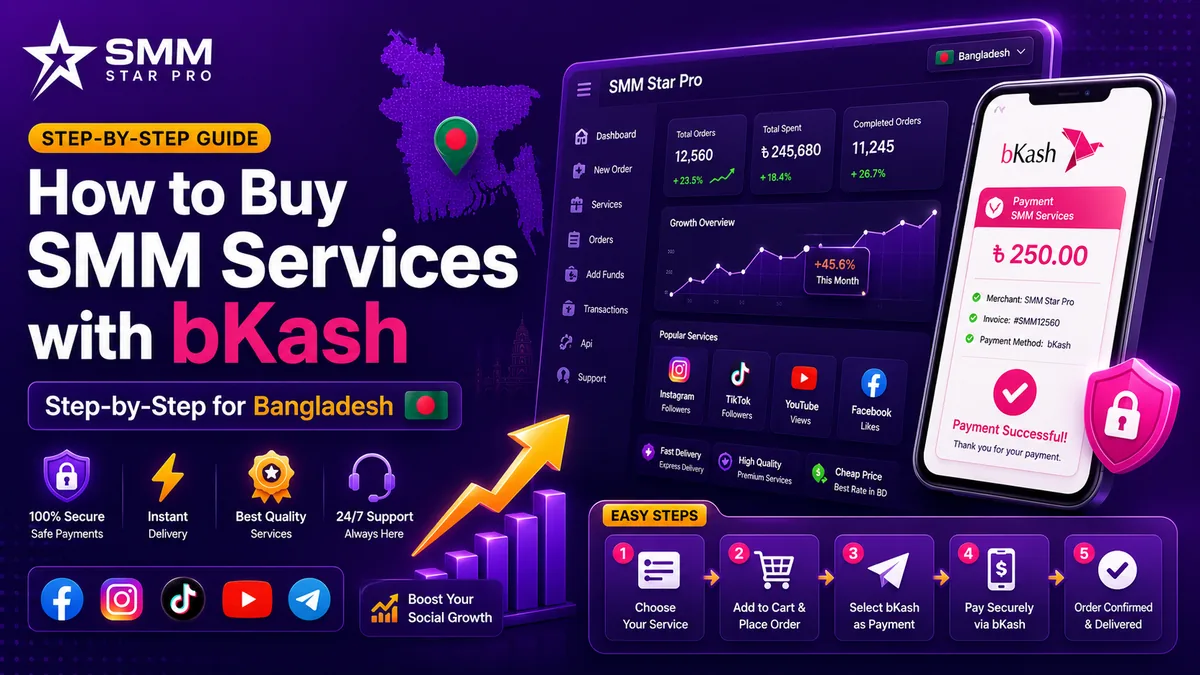
Buying SMM services with bKash comes down to three moves. You add money to your panel balance using the panel’s bKash number or merchant option, you confirm the transaction ID, and then you place an order with your social media link. A bKash-enabled panel turns your mobile money into account balance in BDT, and you spend that on followers, likes, views, or watch time. No international card required, which is the whole reason this method took off here.
Below I will walk through how the bKash flow actually works on a panel, the scams that catch new buyers, the Nagad and Rocket options if bKash is not your thing, and how to place a first order without burning money.
How does paying an SMM panel with bKash work?
Most Bangladesh panels run one of three bKash flows.
- Automated bKash gateway. You enter the amount, the panel generates a payment request, and your balance updates the moment you pay. This is the safest and fastest of the three.
- bKash Send Money to a panel number. You send money to the panel’s listed personal or agent number, then submit the transaction ID (TrxID) on the deposit page. Your balance is credited after someone verifies it.
- bKash Merchant or Make Payment. You pay a merchant number directly, and the added fee is often lower or gone entirely.
Whichever one you use, do it through the panel’s official deposit page. The number one bKash SMM scam is paying a number that some “agent” dropped into a chat. If you cannot see that number on the site itself, treat it as fake. A reputable SMM panel provider will publish its deposit details where everyone can check them.
Step-by-step: adding funds with bKash
- Log in to your panel account and open Add Funds, sometimes labeled Deposit.
- Select bKash as the payment method.
- Enter the amount in BDT. Keep your first test small, somewhere between 50 and 200 BDT.
- Follow the on-screen steps. Either pay through the automated gateway, or use Send Money to the number shown, straight from your bKash app.
- Copy the TrxID out of your bKash confirmation SMS.
- Paste the TrxID and your sender number into the deposit form and submit.
- Wait for the balance to update. It is instant on automated gateways and takes a few minutes when a human verifies the manual deposit.
Hold onto that bKash confirmation SMS until your balance reflects the deposit. And if a panel ever tells you to send an extra fee to “unlock” the money you already deposited, close the tab. That is a scam, every time.
What are the bKash alternatives in Bangladesh?
If bKash is not convenient, most local panels also take a few other methods.
- Nagad. Send-money and cash-out fees are often cheaper, and the TrxID flow is the same.
- Rocket (DBBL Mobile Banking). Common outside Dhaka and Chattogram.
- Bank transfer. Useful for bigger reseller top-ups, where the MFS daily limits start getting in the way.
Use whichever wallet you already keep a balance in. The deposit steps do not change, only the app and the number do. If you are still deciding where to put your money, our rundown of the top panels operating in Bangladesh covers which ones support all of these reliably.
How do you avoid bKash SMM scams?
Scams here are aimed squarely at people who are new to panels. A few habits keep you out of trouble.
- Pay only through the official site’s deposit page. Ignore numbers posted in Facebook comments or dropped in random Telegram groups.
- Never pay a release fee. No real panel asks for more money to free up a balance you already deposited.
- Test with a tiny amount first. A 50 BDT deposit followed by a small order tells you fast whether the panel actually delivers.
- Confirm that pricing is shown in BDT and that support runs on Bangladesh hours (BST, UTC+6).
- Save your TrxID. It is your proof if a manual deposit needs chasing up later.
If anything about a deposit looks off, it usually is. Good panels make it easy to reach a human, so when you are unsure, message their support team before you send a single taka.
How do you place your first order after depositing?
Once your balance shows up in BDT, you are ready to order.
- Pick a service, say Facebook page likes, Instagram followers, or YouTube views. You can browse the full list of available growth services to see what fits.
- Paste the correct link, meaning the public post or profile URL, exactly the way the service asks for it.
- Enter the quantity. The cost in BDT works itself out automatically.
- Confirm and submit, then watch the status in your dashboard.
Order small the first time. Watch the delivery speed and the drop rate over the next 48 to 72 hours, and only then scale up, the same way you would when working out how to choose the best SMM panel for the long run. If your priority is the lowest per-1,000 rate without losing basic retention, it is worth comparing the most budget-friendly panels in the country before you commit to a big order.
Frequently Asked Questions
Can I pay an SMM panel with bKash in Bangladesh?
Yes. Most Bangladesh-focused panels take bKash through an automated gateway or Send Money with TrxID verification. Stick to the panel’s official deposit page.
Is paying with bKash safe?
It is safe on a reputable panel’s official deposit page. The risk comes from paying numbers shared by unverified “agents” or paying a fake release fee. Test with a small deposit first.
What’s the minimum I can add with bKash?
Many panels let you add as little as 50 to 100 BDT, which is ideal for testing delivery before you put in more.
Can I use Nagad or Rocket instead?
Yes. Nagad and Rocket use the same TrxID-based deposit flow, and Nagad often charges lower fees.
How long until my balance updates?
Instant on automated bKash gateways, and a few minutes up to an hour when a manual TrxID needs checking.
Top up with bKash or Nagad, place your first order, then scale whatever works. Start small and let the results decide.